Installation
CruisePlan can be installed using several methods. Choose the one that best fits your environment and use case.
System Requirements
Operating Systems:
Linux
macOS
Windows 10+
Required Software:
Python 3.9 or higher (<3.14) (3.11+ recommended for best performance)
Git (for development installation)
Hardware Requirements:
RAM: 4GB minimum, 8GB+ recommended for large datasets
Storage: 10GB free space (includes bathymetry data)
Internet: Required for initial bathymetry download and PANGAEA integration
Plan for adequate storage space:
Component |
Size |
Purpose |
|---|---|---|
CruisePlan package |
~50MB |
Core software installation |
ETOPO 2022 bathymetry |
~500MB |
Standard resolution depth data (recommended) |
GEBCO 2025 bathymetry |
~7.5GB |
High resolution depth data (optional) |
PANGAEA datasets |
Variable |
Historical cruise data (optional) |
Generated outputs |
~10-100MB |
Maps, schedules, configurations per cruise |
Install options (PyPI, GitHub)
Option 1: Install from PyPI (Most Users)
For general use, install the latest stable release from PyPI:
# Create virtual environment
python -m venv .venv
source .venv/bin/activate  # Windows: .venv\Scripts\activate

# Install CruisePlan
pip install cruiseplan
Then verify installation: run the steps in Verification & Testing
Option 2: Install Latest from GitHub
For the latest features and bug fixes:
# Create virtual environment
python -m venv .venv
source .venv/bin/activate  # Windows: .venv\Scripts\activate

# Install directly from GitHub
pip install git+https://github.com/ocean-uhh/cruiseplan.git
Then verify installation: run the steps in Verification & Testing
Option 3: Development Installation
For development or contributing to CruisePlan:
# Clone the repository
git clone https://github.com/ocean-uhh/cruiseplan.git
cd cruiseplan

# Option A: Using conda/mamba
conda env create -f environment.yml
conda activate cruiseplan
pip install -e ".[dev]"

# Option B: Using pip with virtual environment
python -m venv .venv
source .venv/bin/activate  # Windows: .venv\Scripts\activate
pip install -e ".[dev]"
Then verify installation: run the steps in Verification & Testing
Verification & Testing
After installation, verify CruisePlan is working correctly:
# Check version and core functionality
cruiseplan --version

# Display help and available commands
cruiseplan --help

# Test bathymetry download (requires internet)
cruiseplan bathymetry --help

# Verify interactive components
python -c "import matplotlib; print('✓ Matplotlib available')"
python -c "import folium; print('✓ Folium available')"
Expected output should show version information and available subcommands without errors.
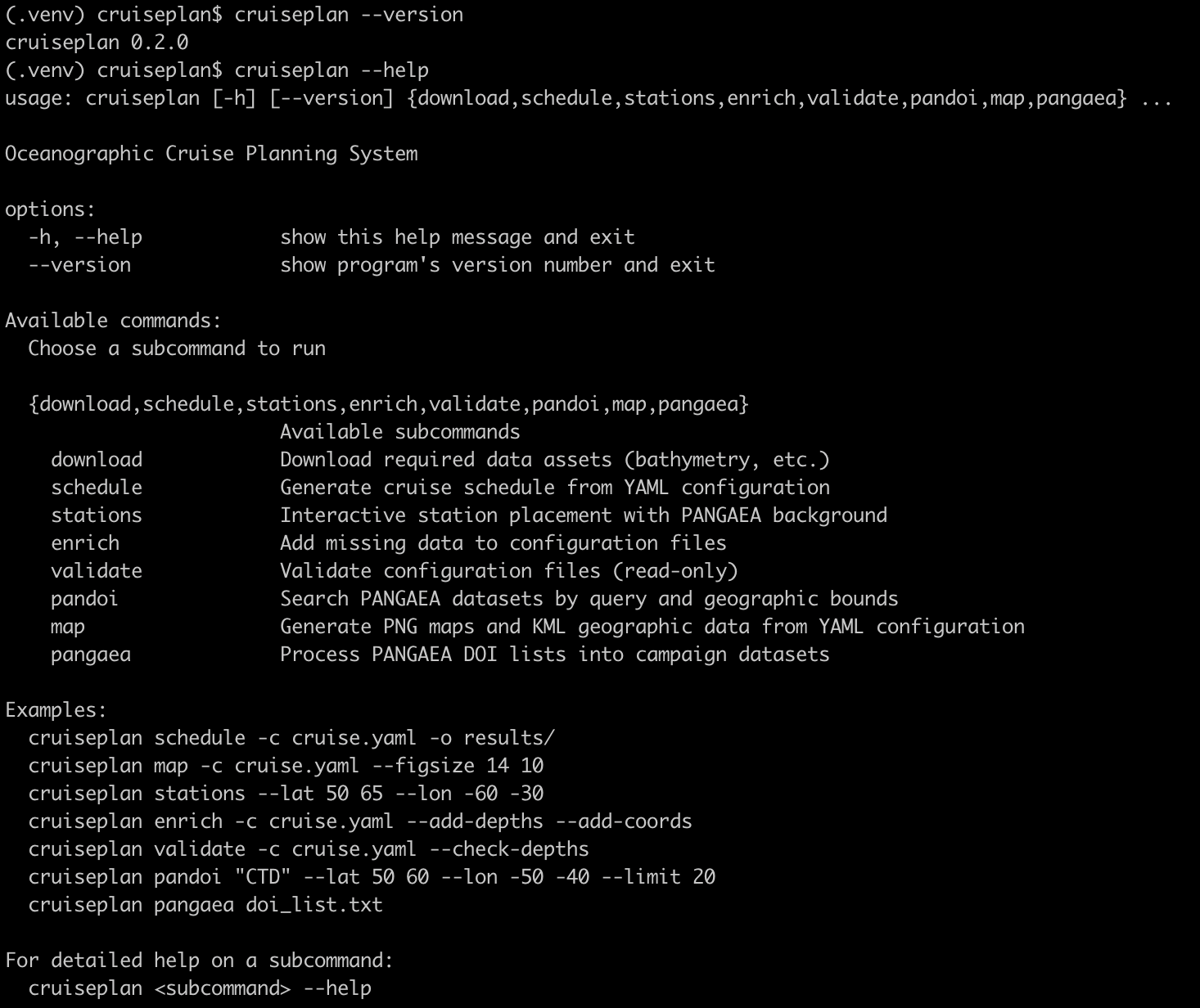
Successful CruisePlan installation showing version information and available commands
Core Dependencies
Core dependencies are listed in requirements.txt, development tools in requirements-dev.txt. The conda environment.yml loads from these files automatically. CruisePlan automatically installs these core dependencies:
Scientific Computing:
numpy >= 1.21 (numerical computing)
pandas >= 1.3.0 (data manipulation)
scipy >= 1.7.0 (scientific algorithms)
xarray >= 2023.12.0 (multi-dimensional data)
netCDF4 >= 1.5.8 (scientific data format)
Web & Data Sources:
Configuration & Validation:
pydantic >= 2.0.0 (data validation)
ruamel.yaml >= 0.18.0 (YAML processing)
Visualization:
matplotlib >= 3.7 (plotting)
folium (interactive maps)
branca (map styling)
User Interface:
Troubleshooting
Issue: “No module named ‘cruiseplan’”
ImportError: No module named 'cruiseplan'
Solution:
Verify Python environment:
which pythonandpython --versionReinstall:
pip install --force-reinstall cruiseplanCheck virtual environment activation
Issue: Permission denied during installation
ERROR: Could not install packages due to an EnvironmentError
Solution:
Use user installation:
pip install --user cruiseplanOr use virtual environment:
python -m venv .venv
Issue: Dependency conflicts
ERROR: pip's dependency resolver does not currently consider all the packages
Solution:
Create fresh virtual environment
Update pip:
pip install --upgrade pip setuptoolsInstall in isolated environment
Getting Help
If installation issues persist:
Check existing issues: GitHub Issues
Create new issue: Include Python version, OS, and complete error message
Discussion forum: GitHub Discussions for usage questions and community support
Include the output of:
python --version
pip show cruiseplan
cruiseplan --version