Usage Overview
This page provides a high-level overview of how to use CruisePlan for oceanographic cruise planning. For detailed step-by-step instructions, see the linked workflow guides below.
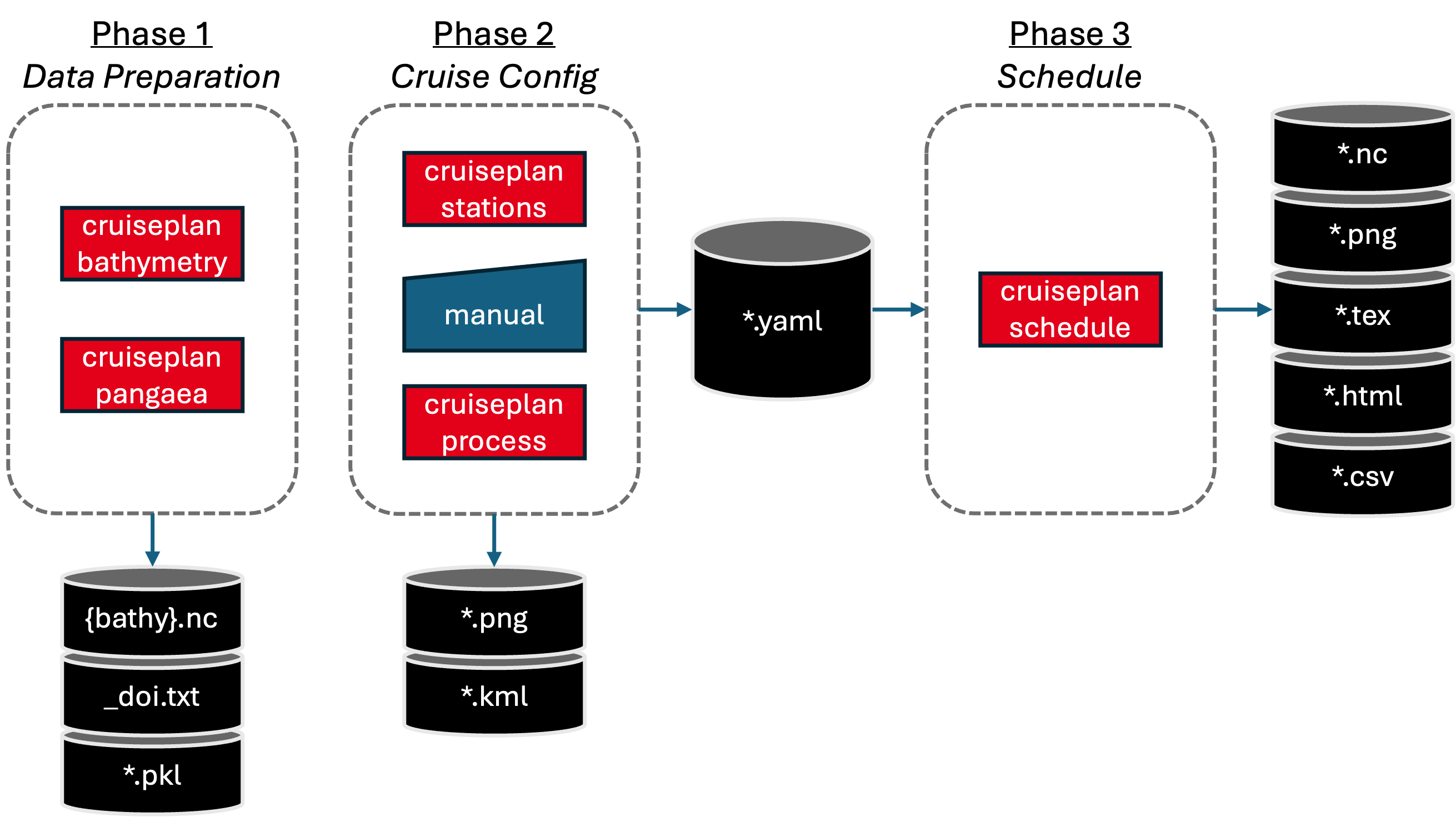
CruisePlan Process Overview: The complete workflow from data preparation through final deliverables, showing the unified cruiseplan process command and individual command options. CruisePlan commands are in red, files in black, and the blue box indicates where manual editing occurs.
Three-Phase Workflow
CruisePlan follows a systematic three-phase approach to cruise planning:
Phase 1: Data Preparation
Goal: Gather external datasets needed for planning
Download bathymetry:
cruiseplan bathymetry- Acquire global depth data (ETOPO/GEBCO)Search and download historical data:
cruiseplan pangaea- Find and process PANGAEA datasets by query + region, or process existing DOI files
This phase provides the foundational data layers for informed station placement.
Phase 2: Cruise Configuration
Goal: Define your cruise plan and validate the configuration
Interactive planning:
cruiseplan stations- Place points on interactive maps with bathymetryManual editing: Edit generated YAML configuration to define operation types, actions, legs, and clusters
Enrich metadata:
cruiseplan process- Add depths, coordinates, and expand sections automatically, validate configuration, and generate maps
This phase creates and refines your complete cruise configuration file.
Phase 3: Schedule Generation
Goal: Generate final cruise timeline and professional outputs
Create schedule:
cruiseplan schedule- Calculate timing and generate deliverablesMultiple formats: HTML summaries, LaTeX tables, NetCDF files, KML exports, PNG maps
This phase produces documentation in various formats for cruise proposals (png figure + latex tables) and onward manipulation in python (netCDF).
YAML Configuration Structure
CruisePlan uses YAML files as the central configuration format. These files contain two main components:
- Catalog Section
Defines all available elements:
points: Geographic locations with operation types (CTD, mooring, etc.)lines: Movement between locations or survey patternsareas: Defined working regionslegs: Groupings of operations for scheduling
- Schedule Section
Defines the sequence:
legs: Ordered list of operations to performclusters: Strategic groupings and routing optimizations
The catalog acts as a “library” of all possible operations, while the schedule determines which ones to execute and in what order. This separation allows flexible reuse of point definitions across different cruise scenarios.
For complete YAML syntax and options, see the YAML Configuration Reference.
How to Get Started
Get started immediately with:
cruiseplan --help
This displays all available commands with brief descriptions, helping you choose the right tool for your planning needs.
Or choose your preferred approach and follow the guides:
Command Line Workflows
Follow the comprehensive User Workflows (CLI) guide for three different planning scenarios:
Basic Planning: Simple workflow without historical data
PANGAEA-Enhanced: Incorporating historical oceanographic data
Configuration-Only: Processing existing YAML files
- Jupyter Notebook Approach
CruisePlan provides a Python API for programmatic usage:
Interactive Python API usage
Data analysis integration
Programmatic configuration generation
Custom visualization examples
- Configuration Reference
Consult the YAML Configuration Reference for:
Complete field documentation
Validation rules and constraints
Example configurations
Best practices