HTML Output
HTML format provides interactive web summaries ideal for cruise documentation, review, and sharing. The output includes embedded maps, detailed timelines, and operation summaries.
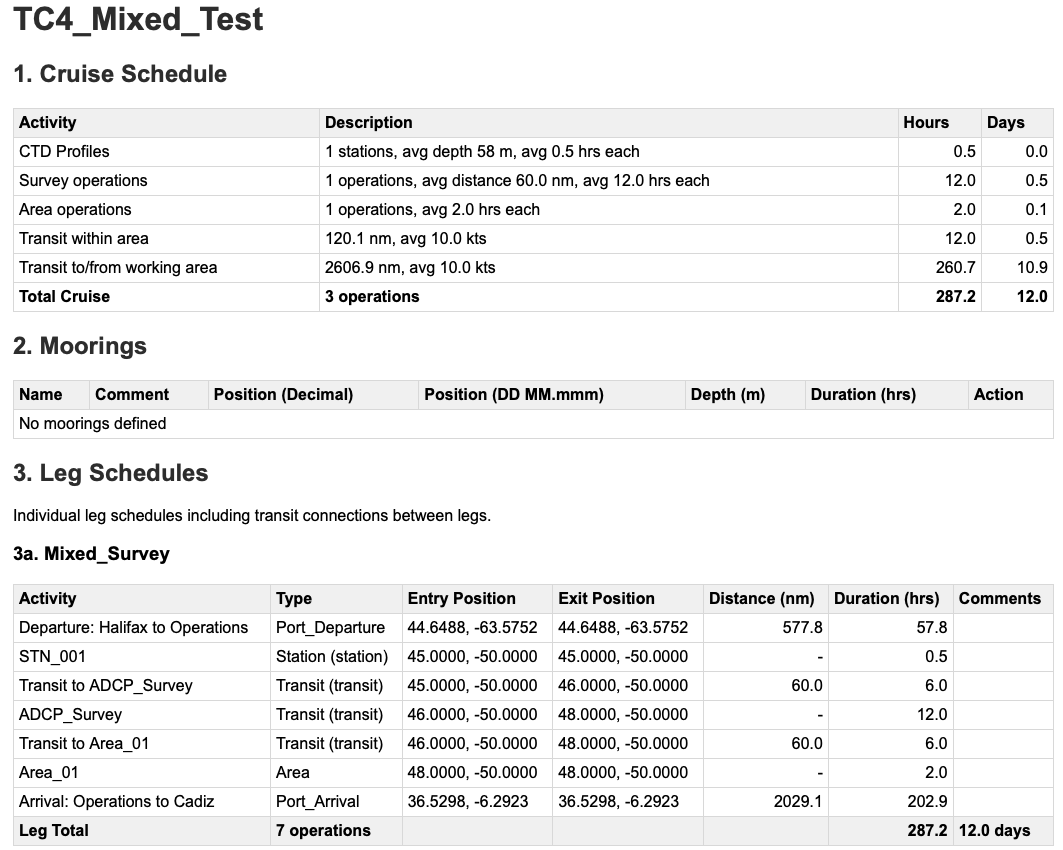
HTML cruise schedule from tc4_mixed_ops_enriched.yaml, demonstrating the interactive web format with embedded map visualization, detailed operation timeline, and comprehensive cruise statistics suitable for review and operational planning. If available, the map generated by cruiseplan schedule is embedded directly within the HTML output for easy access.
Note
HTML output is available from the schedule command (cruiseplan schedule --format html png), where including PNG generates a static map image alongside the HTML file.
Purpose and Use Cases
- Primary Uses:
Quick verification of the cruiseplan against the yaml, to identify problems in calculations
Separate operations tables for each leg
Complete moorings list
HTML Structure
Generated HTML files include multiple sections:
- 1. Cruise schedule
Summary table with the activities and transits, with a total in hours and days. For CTD stations, it also gives the number of stations, average depths and average durations, and for the transits, the total distance and average speed. These can be useful for cruise proposals to give an overview of the planned operations.
- 2. Moorings
A list of moored operations, including the name, activity (deployment or recovery), location in both decimal degrees and DMM format, duration and action. This also gives a quick check that the moorings do not use the default 999.0 hours duration.
- 3. Leg Schedules
Activity tables for each leg of the cruise, showing the activity, type of action, start and end location for the activity (using the entry/exit nomenclature used in the code), the distance (if it’s a transit) and duration of the activity.
Tip
To quickly compare different versions of the same cruise, you can include them in one yaml as a different leg. See the example tc2_two_legs.yaml in the test fixtures.
Technical Specifications
File Structure
<!DOCTYPE html>
<html lang="en">
<head>
    <title>Arctic Survey 2024 - Cruise Schedule</title>
    <meta charset="UTF-8">
    <meta name="viewport" content="width=device-width, initial-scale=1.0">
    <!-- Embedded CSS and JavaScript -->
</head>
<body>
    <header>
        <h1>Cruise Schedule: Arctic Survey 2024</h1>
        <nav><!-- Navigation menu --></nav>
    </header>

    <main>
        <section id="summary"><!-- Executive summary --></section>
        <section id="map"><!-- Interactive map --></section>
        <section id="timeline"><!-- Detailed timeline --></section>
        <section id="catalog"><!-- Operation catalog --></section>
    </main>

    <footer>
        <p>Generated by CruisePlan {{ version }}</p>
    </footer>
</body>
</html>
Usage Recommendations
- For Proposal Preparation:
Generate HTML for initial review and feedback
The HTML output format provides a quick view of stations and operation timing, for reality checks on the cruise plan outputs.